- 01-29-2013, 08:02 AM
Thread Author #1
MacBook Pro lagging
Hey guys, been having my macbook pro 15" for 1.5 years, lately it's been lagging a bit. Is there a way to make it run smoother? I cant afford to upgrade anything interiorlly, however is there a FREE app out there that can reduce the lag or make your mac runs smoother?
- 01-29-2013, 08:04 AM #2
- 01-29-2013, 12:40 PM #3
Re: MacBook Pro lagging
You need to give us some specifics before anyone can legitimately help you here...
- What are you describing as lag? (what exactly is it doing?)
- When is the computer lagging?
...as far as downloadable software to fix this issue, i don't think any of them are going to be a real "fix" without knowing what is going on. There are several things that could be hogging RAM, there could be hardware failure, etc. We need more info.
Also, have you reset your SMC and PRAM? If not, google it and follow instructions...sometimes this can really help a macbook stuck in a weird rut."Speed has never killed anyone; suddenly becoming stationary...that's what gets you." - Jeremy Clarkson - 01-29-2013, 12:54 PM #4
Re: MacBook Pro lagging
Memory spec's
If to little it will hurt ya... - 01-31-2013, 07:50 AM #5
Re: MacBook Pro lagging
Without any details on your computer specs. or particulars on the issue I can tell you that using an SSD to run the OS and topping up the RAM will resolve the lags for the lifetime of the computer. I used OWC data doubler on my 2 1/2 year old MBP (which was getting slower and slower) and it is now zipping fast. I got a case for the optical drive for the odd time I need it. OWC has excellent video to help you do the job, take your time, don't rush, ground yourself and you will love the new found speed.
Good luck - 01-31-2013, 08:23 AM #6
Re: MacBook Pro lagging
Any chance you're running the Messages app? There have been numerous reports of it being buggy and getting stuck in a Not Responding state that eats up all your RAM and slows your computer to a crawl. Check the Activity Monitor to see if that's the case. (Finder>Applications>Utilities>Activity Monitor)
- 02-23-2013, 04:51 AM
Thread Author #7
Re: MacBook Pro lagging
nope not runnning the messages app..
I think it's my ram.. since I run a lot of apps.. not that much but like chrome, evernote, mail, reminder, iceclean, skype, and itunes. - 02-23-2013, 09:19 AM #8
Re: MacBook Pro lagging
iPhone 5 (Black.32GB.AT&T) iPad Mini (Black.32GB.WiFi) iPad (3Gen.Black.64GB.AT&T) MacBook Pro (15" 2012.Retina Display.i7) iMac (21.5" 2011.i5) AppleTV (3Gen) - 02-23-2013, 09:44 AM #9
Re: MacBook Pro lagging
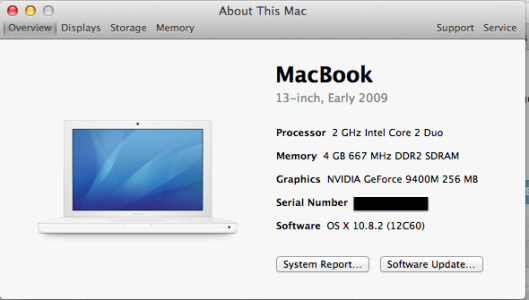
I agree with NPBeck79 that you should consider a clean install of whatever OS X version you have. Running the aforementioned apps should not cause your MacBook Pro to lag in the manner I am understanding it. I have a MacBook that I bought in March 2009 and it is still running smoothly. See the specs via the attached screenshot.
Screen Shot 2013-02-23 at 10.42.03 AM.png - 02-23-2013, 09:45 AM #10
MacBook Pro lagging
If you're running all of them at the same time, yes, you're going to see some lag. You will need to shut a few down and only run 2-3 at a time or upgrade your RAM. Upgrading memory is pretty easy and cheap. $50-$75 for an upgrade. That may be your best bet if you want to continue to run 5+ programs together.
Tappin and Talkin from my iPhone 5 - 02-23-2013, 11:23 AM #11
Re: MacBook Pro lagging
By the way, have you opened Activity Monitor to see which programs are using the most resources? You might find that some are stuck in a Not Responding state and are just eating RAM. You can kill whatever apps you want from there.
- 02-24-2013, 12:38 AM
Thread Author #12
- 02-24-2013, 02:38 AM
Thread Author #13
- 02-26-2013, 01:08 PM #14
MacBook Pro lagging
Enter Terminal: Type the following command without quotes "sudo periodic daily weekly monthly" you will then be prompted to enter your password. This will speed things up a tad on a laptop. Also run disk utility and repair permissions. I like to do a reboot after both.
- 02-28-2013, 06:52 AM #15
Re: MacBook Pro lagging
Google Chrome is a resource hog...just FYI.
4GB of RAM is so easily and cheaply upgraded these days that it's hard to imagine someone sticking with that amount if their computer was having problems."Speed has never killed anyone; suddenly becoming stationary...that's what gets you." - Jeremy Clarkson - 02-28-2013, 07:00 AM #16
MacBook Pro lagging
Yes to all of what he said. You can easily double that RAM for less than $50. Also, Chrome is a memory hog, is slower, and has less features than Safari. Unless you have a certain reason you use Chrome, switching to Safari will help speed everything up.
Tappin and Talkin from my iPhone 5
Similar Threads
-
iPad, Macbook Pro, or iMac?
By nccows in forum Original iPadReplies: 16Last Post: 10-01-2010, 03:11 PM -
Considring buying a Macbook pro.. Need advice/suggestions
By ptb6744 in forum Other OS's and DevicesReplies: 1Last Post: 02-12-2010, 03:57 PM -
New iMac to go with my Macbook Pro.
By cjvitek in forum Other OS's and DevicesReplies: 5Last Post: 11-01-2009, 08:18 PM -
Purchased MacBook Pro 7/25/09
By Jgittere in forum iPhone 4Replies: 2Last Post: 08-24-2009, 09:28 PM -
"Unibody" iPhone - Matches MacBook Pro Line
By Jellotime91 in forum iPhone 4Replies: 11Last Post: 06-13-2009, 08:07 PM

LinkBack URL
About LinkBacks
Reply