Results 1 to 20 of 20
- 02-16-2013, 02:20 PM
Thread Author #1
Theme: ClearHighNotifications
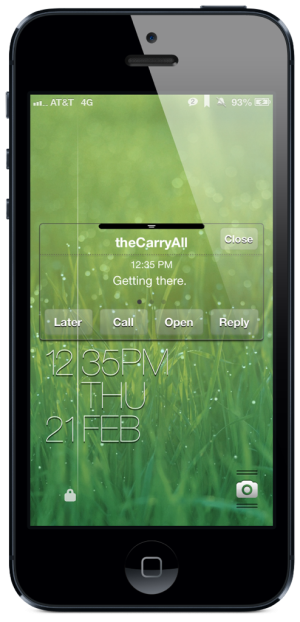
For those of you using fullscreen lockscreen themes: a way to make your notifications look a little better. The attached theme will give you transparent popup sliders and will move the secondary notification bars to the top of your screen; if you also want to make those secondary notifications clear you'll need to download NoLockNotificationsBG from Cydia. Tested on iPhone 5.
e3eXuxY.jpg
(If you don't want this first popup to be clear--it might not look great depending on your wallpaper--just delete the springboard folder from the theme's Bundles folder and the WellLock image from the Telephony folder. That will leave you with only the change in height for the secondary notifications.)
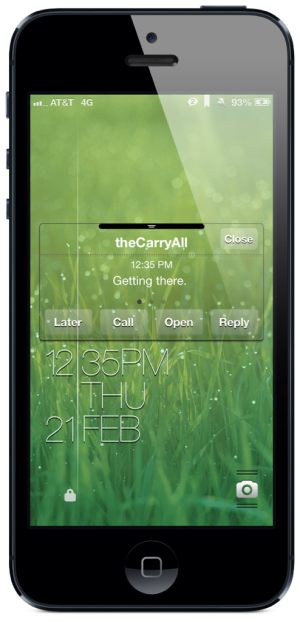
(Edit: Due to some interest on reddit I worked up a simple BiteSMS transparent popup to go with this theme. I don't think it actually looks all that good except on very plain backgrounds--anything busy--like a homescreen--and it gets hard to read.)
Do9Z1vA.png
There are probably a few ways to do this, but here is what I did: buy the biteLiquid theme and replace the qc texture image in the theme folder with the one linked here:
I also changed the qr background color value in the info.plist to be #ffffff01 but I'm not sure if that was necessary. I left the text entry field opaque for the sake of readability, but you could probably make that transparent as well. Anyway, make the changes and reapply the theme and there you go.
Enjoy!Last edited by Massie; 02-23-2013 at 07:55 AM.
- 02-16-2013, 02:37 PM #2
Re: Theme: ClearHighNotifications
i wonder how this looks with LI5?
- 02-16-2013, 02:53 PM #3
- 02-16-2013, 03:44 PM
Thread Author #4
Re: Theme: ClearHighNotifications
Yeah, this isn't meant for use with Lockinfo or other notification replacements, just the native one.
- 02-16-2013, 05:11 PM #5
Re: Theme: ClearHighNotifications
thanks guys, you probably saved me a couple of hours of tweaking, restoring and re-jailbreaking!
- 02-17-2013, 01:04 AM #6
- 02-21-2013, 01:04 PM #7
- 02-21-2013, 04:32 PM #8
Re: Theme: ClearHighNotifications
Massie - How did you get the notifications to go 'high' and not stop below where the stock clock usually resides? Is this something I can take from that theme or is it just a positioning that I can change? Thanks!
I looked in the theme files and think maybe the BarLCD file is the answer but not too sure. - 02-21-2013, 04:48 PM
Thread Author #9
Re: Theme: ClearHighNotifications
The lockscreen is called Blink and is not included in the download. It can easily be found online; you'll need to install it manually into the Library/Themes folder once you get it.
Yes, the BarLCD image is what makes it so the notifications can be higher. It just replaces the clock area with a 1px high image. (You'll want Lockscreen Clock Hide as well.) - 02-21-2013, 04:52 PM #10
- 02-21-2013, 06:07 PM
Thread Author #11
Re: Theme: ClearHighNotifications
Due to some interest on reddit I worked up a simple BiteSMS transparent popup to go with this theme:
Do9Z1vA.png
There are probably a few ways to do this, but here is what I did: buy the biteLiquid theme and replace the qc texture image in the theme folder with the one linked here:
I also changed the qr background color value in the info.plist to be #ffffff01 but I'm not sure if that was necessary. I left the text entry field opaque for the sake of readability, but you could probably make that transparent as well. Anyway, make the changes and reapply the theme and there you go. - 02-22-2013, 03:06 PM #12
Re: Theme: ClearHighNotifications
Thanks for the clarification Massie.
A few more questions: Where do I add the 'Bundles' folder in your rar file?
Also, I would like to use my Zeilk Matte theme for bitesms since I prefer that theme. Where is the file to edit the lockscreen reply box located? I presume it's the same procedure as biteliquid? - 02-22-2013, 04:11 PM
Thread Author #13
Re: Theme: ClearHighNotifications
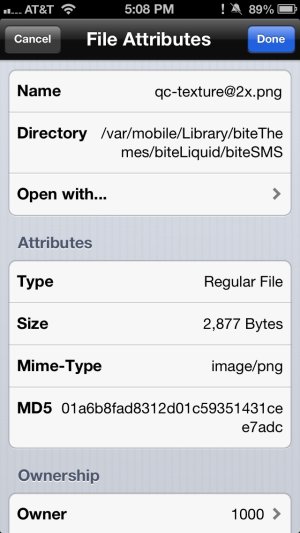
You mean the .zip for the whole theme? You just unzip it and place the entire ClearHighNotifications folder into Library/Themes. You don't need to take the Bundles folder out of it. The Bite image is located in the bite themes directory listed here, but it might not work with a non-transparent theme.
image.jpg - 02-23-2013, 02:19 PM #14
- 02-23-2013, 03:12 PM
Thread Author #15
- 02-24-2013, 10:30 PM #16
- 02-26-2013, 05:33 PM #17
- 02-26-2013, 08:11 PM
Thread Author #18
Re: Theme: ClearHighNotifications
Download the theme and enable it in Winterboard. Are you familiar with how to install themes without using Cydia?
- 02-26-2013, 10:59 PM #19
- 03-06-2013, 09:00 PM #20
Similar Threads
-
Best Springboard theme
By schartzr in forum Jailbreaking, Unlocking, Hacks, Themes & ModsReplies: 111Last Post: 01-03-2010, 04:58 PM -
All black theme
By emilio2575 in forum Jailbreaking, Unlocking, Hacks, Themes & ModsReplies: 4Last Post: 12-03-2008, 03:12 PM -
Themes?
By kioe024 in forum iPhone 4Replies: 3Last Post: 10-15-2008, 10:57 AM -
Nes Roms/themes?
By duhockey in forum Jailbreaking, Unlocking, Hacks, Themes & ModsReplies: 3Last Post: 09-24-2008, 09:21 AM -
What phone is this running an iPhone theme?
By odnerd in forum iPhone 4Replies: 9Last Post: 04-12-2007, 12:34 PM

LinkBack URL
About LinkBacks
Reply