DEAL OF THE DAY: Save 37% on the Seidio VITREO Screen Guard for iPhone 5!
Results 1 to 19 of 19
  1. Thread AuthorThread Author   #1  
    dvigue's Avatar
    iPhone Intermediate

    Posts
    177 Posts
    Global Posts
    1,008 Global Posts

    Arrow Jailbreak and "reset all settings"

    why is it when i reset all settings after a jailbreak, my phone bricks? is that a known No no to do?

    THanks!
  2. #2  
    pkang's Avatar
    iPhone Beginner

    Posts
    64 Posts
    Global Posts
    69 Global Posts

    Default

    well there are different reasons sometimes and sometimes it goes smoothly. Just google the error code and most likely you will find a solution someone came across. There are rarely any case for bricked phone anymore
  3. #3  
    Ipheuria's Avatar
    iPhone Genius

    Posts
    4,719 Posts
    iOS Version
    iOS 6

    Default

    Yes like they said Brick means just that it is as useless as a brick. The term has been misused just wanted to put you on the right track. We would need a little more info like how is it unresponsive? Why did you need to reset all settings? What tool did you use to JB? Usually people don't reset the settings so it's going to be hard for anyone to answer your question.
    can't upgrade via iTunes check this thread http://forum.tipb.com/jailbreak-unlo...ml#post1717460
    ~32GB Slate iPhone 5(Ferrari)~15" i5 MBP(Omega)~OS X Mountain Lion~32GB iPad 3(McLaren)~
    iPheuria aka The Jailbr3ak kid
  4. #4  
    3seven1's Avatar
    iPhone Intermediate

    Posts
    138 Posts

    Default

    I don't know what you mean by bricked. Is it stuck in recovery mode? You could use Tiny Umbrella to kick it out of recovery mode.
  5. #5  
    mhpspeed's Avatar
    iPhone Nanite

    Posts
    3 Posts
    Global Posts
    55 Global Posts

    Default

    I am having a similar problem to this; earlier today I jailbroke my used ip4 with greenpoison.

    After installing cydia, something weird happen and most of the default icons were missing off the screen, for example, phone, ipod, app store, and some of the others ones that when not jailbroken can not be deleted.

    I decided to ignorantly reset the phone and erase everything with out researching first, and now when trying to turn the phone on, it stalls in the boot animation when the apple turns to a skull and the loading icon freezes over the skull.

    So technically not a "brick?" cause it turns on, but freezes during the boot animation.

    Anybody got any help?
  6. #6  
    Ipheuria's Avatar
    iPhone Genius

    Posts
    4,719 Posts
    iOS Version
    iOS 6

    Default

    Please, Please, Please I have asked this over and over if you JB and something has gone wrong ask and wait for some help. Please do not try to do things you think might fix the problem if it's just a guess. Search the site how to put your phone into DFU mode, this allows you to reload the firmware without loadiing the firmware on the phone. Once you've got the phone in DFU mode open iTunes it will say there is an iPhone in recovery so click restore to restore the Apple firmware. Then re-JB with Greenpois0n, are you on a Mac or Windows? I'm guessing Windows since you used Greenpois0n. If you get an error or something post up, add me on Twitter and send me a message or ask for my email and I'll get you up and running.
    can't upgrade via iTunes check this thread http://forum.tipb.com/jailbreak-unlo...ml#post1717460
    ~32GB Slate iPhone 5(Ferrari)~15" i5 MBP(Omega)~OS X Mountain Lion~32GB iPad 3(McLaren)~
    iPheuria aka The Jailbr3ak kid
  7. #7  
    mhpspeed's Avatar
    iPhone Nanite

    Posts
    3 Posts
    Global Posts
    55 Global Posts

    Default

    I have a mac, I keep trying to put it into DFU mode. The phone doesn't really power off totally, and the only way to get it to shut off, i.e. restart, after it freezes is to hold down the home and sleep button. I've been able to get into recovery mode, usually I get some type of animation so Im not sure if its DFU or not, I am assuming not because when I clicked restore in iTunes it gave me the pop of that it was going to restore and update and contact Apple, thats not what I want? the ip4 screen needs to be black, correct?
  8. #8  
    mhpspeed's Avatar
    iPhone Nanite

    Posts
    3 Posts
    Global Posts
    55 Global Posts

    Default

    Nevermind, played around, searched, found the answers and got it up and running. Thanks for the input.
  9. #9  
    Ipheuria's Avatar
    iPhone Genius

    Posts
    4,719 Posts
    iOS Version
    iOS 6

    Default

    If you have a Mac go to iClarified.com and look in the tutorials. I much rather use pwnage tool to JB. It will wipe your phone though because it reloads the firmware.
    Last edited by Ipheuria; 03-05-2011 at 05:33 PM.
    can't upgrade via iTunes check this thread http://forum.tipb.com/jailbreak-unlo...ml#post1717460
    ~32GB Slate iPhone 5(Ferrari)~15" i5 MBP(Omega)~OS X Mountain Lion~32GB iPad 3(McLaren)~
    iPheuria aka The Jailbr3ak kid
  10. #10  
    kbphoto615's Avatar
    iPhone Nanite

    Posts
    7 Posts
    Global Posts
    11 Global Posts

    Default

    how did you get your phone up and running? A friend of mines kid messed with my phone and reset all my settings and now I'm having some major issues. Any help would be greatly appreciated
  11. #11  
    3cit's Avatar
    iPhone Elite

    Posts
    2,345 Posts
    iOS Version
    5.1.1

    Default

    Quote Originally Posted by kbphoto615 View Post
    how did you get your phone up and running? A friend of mines kid messed with my phone and reset all my settings and now I'm having some major issues. Any help would be greatly appreciated
    First step is a thorough beatdown of said kid!
  12. #12  
    kbphoto615's Avatar
    iPhone Nanite

    Posts
    7 Posts
    Global Posts
    11 Global Posts

    Default

    Quote Originally Posted by 3cit View Post
    First step is a thorough beatdown of said kid!
    haha yeah no crap. she's never touching my phone again.
  13. #13  
    Ipheuria's Avatar
    iPhone Genius

    Posts
    4,719 Posts
    iOS Version
    iOS 6

    Default

    Hey kb you should post up your screenshots here too some other people might be able to help you out even if my suggestions don't help. I really am starting to think it has something to do with infidock or infinifolders after seeing your screenshots.
    can't upgrade via iTunes check this thread http://forum.tipb.com/jailbreak-unlo...ml#post1717460
    ~32GB Slate iPhone 5(Ferrari)~15" i5 MBP(Omega)~OS X Mountain Lion~32GB iPad 3(McLaren)~
    iPheuria aka The Jailbr3ak kid
  14. #14  
    kbphoto615's Avatar
    iPhone Nanite

    Posts
    7 Posts
    Global Posts
    11 Global Posts

    Default

    Hey iPheuria, ok here's the screen shots.


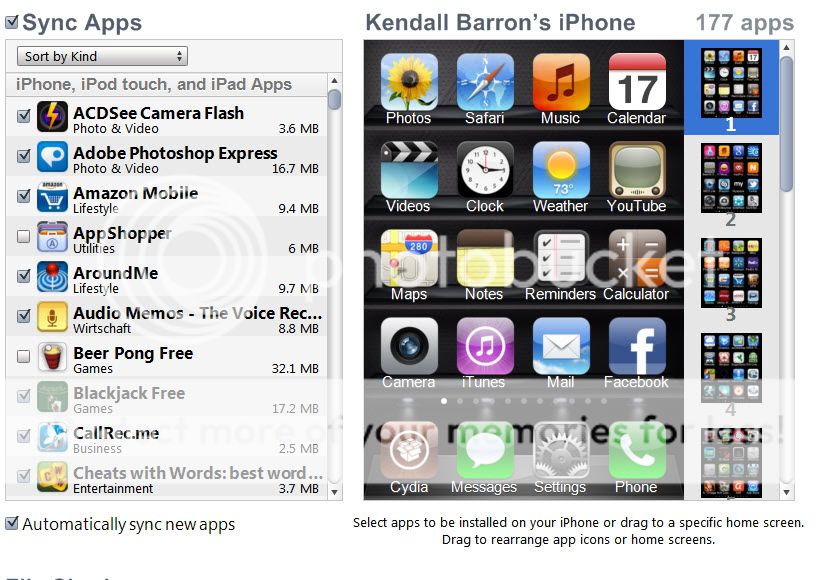
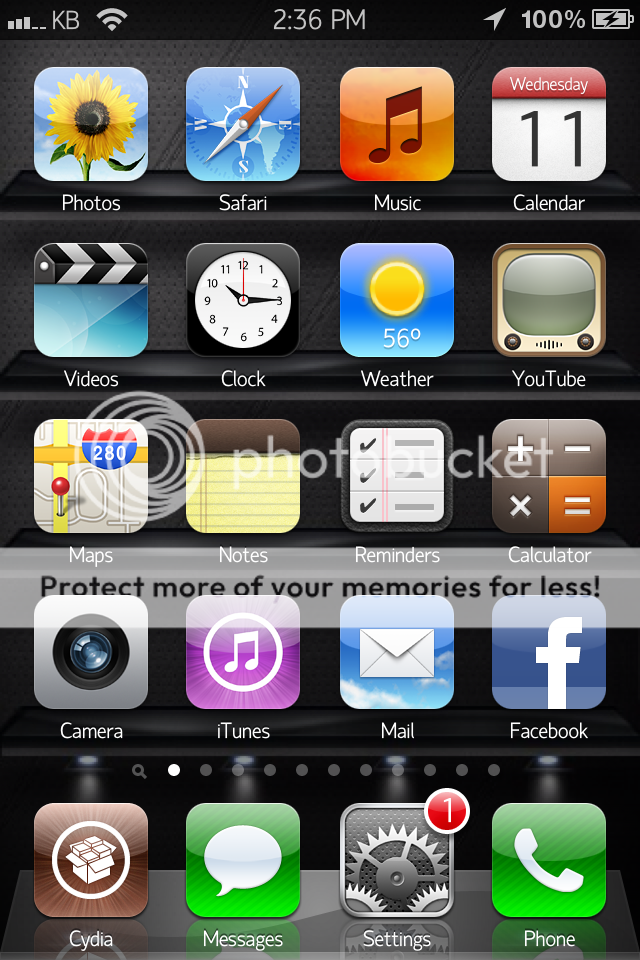
    Just to explain the screenshots, what you're seeing are the iPhone view screenshots, and the iTunes view screenshots. The screenshots from iTunes is what iTunes sees on my iPhone. The screenshots from my iPhone are what actually happens when I sync my phone. I will add apps to folders in iTunes as people normally would, then I 'apply' the changes and sync the phone. As I am syncing the phone, I can physically see iTunes adding the apps randomly across my home pages on the iPhone, not in folders (how I originally arranged them in iTunes)

    If you see on screenshot number 2 above, it has some random apps in folders? but on screenshot number 3 ( the itunes view of page 2 ), you can see that iTunes shows no apps in any folders? WTF?? How is this possible? I mean I have a basic understanding of why it doesn't show cracked apps sometimes or tweaks, but I've uninstalled most tweaks.

    No matter what I do, restore from backup, re-arrange apps, remove apps, add apps one at a time, it does not add sync the apps properly. It just throws them randomly across my phone, and I have no idea why it's doing this. I had infinidock and infinifolders installed, but I uninstalled them when I ran into this issue, and still the problem persists.
    Attached Images Attached Images
    Last edited by kbphoto615; 04-11-2012 at 05:41 PM.
  15. #15  
    reahn's Avatar
    iPhone Beginner

    Posts
    67 Posts

    Default

    Well first off... you can never do 'reset all settings' or 'erase all contendt and settings' because it will put a jailbroken phone in a boot loop. because the ios is modified.


    Sent from my iPhone using Tapapoop
  16. #16  
    kbphoto615's Avatar
    iPhone Nanite

    Posts
    7 Posts
    Global Posts
    11 Global Posts

    Default

    yeah thanks for that guy. haha


    Thanks for everyones help! I got the problem sorted finally. I uninstalled the bug fixes on cydia and then my phone synced correctly.
  17. #17  
    iDonev's Avatar
    iPhone Experts

    Posts
    873 Posts
    Global Posts
    875 Global Posts
    iOS Version
    6.1

    Default

    I already created a thread in the JB apps/tweaks about this, but it might be worth mentioning it here as well: It's a good precaution installing ResetAllKiller from Cydia. This will make sure no harmful resets befall your jailbroken device.
  18. #18  
    jasneetwashere's Avatar
    iPhone Nanite

    Posts
    1 Posts

    Default how did you do it

    Quote Originally Posted by mhpspeed View Post
    Nevermind, played around, searched, found the answers and got it up and running. Thanks for the input.
    hi im having the same problem for my iphone 4 could u tell me how u did it
  19. #19  
    reahn's Avatar
    iPhone Beginner

    Posts
    67 Posts

    Default

    Quote Originally Posted by jasneetwashere View Post
    hi im having the same problem for my iphone 4 could u tell me how u did it
    Put the iPhone in DFU mode. If you do not know how to do that, google it. Then, open iTunes and hit restore.

Posting Permissions