Results 1 to 24 of 24
- 12-30-2012, 05:25 PM
Thread Author #1
Help adding songs with a different laptop without syncing
The laptop my phone is synced with isn't working right now due to the charging port being jacked up. I want to add songs to my phone on a friend's computer but don't want to sync it to his.
It says I have to change the settings on my phone to "manual add" or whatever but when I try to do it from his computer it again says I have to sync the whole things to it just to change the setting.
Help please. - 12-30-2012, 05:40 PM #2
Re: Help adding songs with a different laptop without syncing
iTunes only allows a device to be synched with one computer at a time. To sync it with a different computer requires all apps/audio/video synched from a different computer to be removed/wiped. It’s just how it works. No way around it that I know of. And, AFAIK, it’s always been that way.
iPhone 5 (Black.32GB.AT&T) iPad Mini (Black.32GB.WiFi) iPad (3Gen.Black.64GB.AT&T) MacBook Pro (15" 2012.Retina Display.i7) iMac (21.5" 2011.i5) AppleTV (3Gen) - 12-30-2012, 05:44 PM
Thread Author #3
- 12-30-2012, 05:45 PM #4
Re: Help adding songs with a different laptop without syncing
iPhone 5 (Black.32GB.AT&T) iPad Mini (Black.32GB.WiFi) iPad (3Gen.Black.64GB.AT&T) MacBook Pro (15" 2012.Retina Display.i7) iMac (21.5" 2011.i5) AppleTV (3Gen) - 12-30-2012, 06:03 PM #5
Help adding songs with a different laptop without syncing
It don't allow it because you don't own those songs it's a copy right thing
Only way it for your friends iTunes to to think its his phone and sync it ..
If songs are not from iTunes there is a app that will put them on your phone I think it's called share pod but it can not load any drm protected media
Sent from my iPhone 5 from a galaxy far far away (in the USA ) using Tapatalk ! - 12-30-2012, 06:23 PM
Thread Author #6
- 12-30-2012, 06:57 PM #7
Help adding songs with a different laptop without syncing
You have to drag and drop the actual music files
Brought to you from my iPad 4 LTE routed and bouncing across the globe on multiple servers from Tapatalk ! - 12-30-2012, 07:21 PM
Thread Author #8
- 12-30-2012, 09:08 PM #9
Help adding songs with a different laptop without syncing
- 01-03-2013, 10:39 AM #10
Re: Help adding songs with a different laptop without syncing
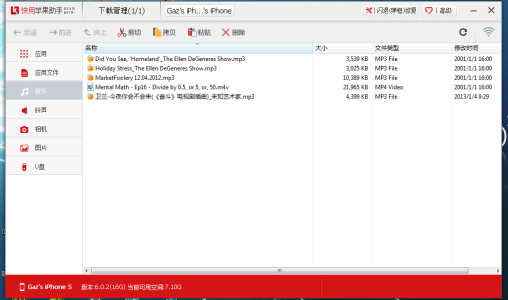
I think I know a way to help you. there is a Chinese software called '快用苹果助手', you search it on google, the first item will be it. figure a way go download it, '2012 beta2' is the stable version. after installation, connect your iphone, it doesn't matter iphone is jailbreaked or not. click your iphone's name, find the music symbol on the left, then all your music will be shown, you just can manage all you music by copy and paste, you can add as many songs as you can without considering any concept of sync. manage it like doing with your windows 7.Capture.PNG
- 01-03-2013, 03:47 PM #11
Re: Help adding songs with a different laptop without syncing
hi gaz chao i tired this and downloaded the 2012 beta 2 but it seems to only have apps when connected my iphone name is not at the top only in bottom right hand corner I try to click on my iphone name in bottom right nothing happens and its all in different language so cant figure it out? any help will be usefull?
- 01-03-2013, 03:58 PM #12
Re: Help adding songs with a different laptop without syncing
"Speed has never killed anyone; suddenly becoming stationary...that's what gets you." - Jeremy Clarkson - 01-03-2013, 04:21 PM #13
- 01-03-2013, 04:25 PM #14
Help adding songs with a different laptop without syncing
Assuming the are DRM free and legally belong to you, just dump them in DropBox and access them from any computer or iOS device.
- 01-03-2013, 04:36 PM #15
Re: Help adding songs with a different laptop without syncing
ok thanks peoples not sure what to say really what is a drm and what is dumping them in drop box?
also just abit confused as i used my sis i tunes and uploaded stuff took the phone out reconnected and continued loading more tunes but when I connected to my I tunes it wiped the device, loaded with some basic songs off my own memory card now when i re connect it says its going to wipe again any reason why? also i could not find sharepod on app store I did download the chinese site programme on to my laptop but i will remove it as i can not read itLast edited by bbjp01; 01-03-2013 at 04:50 PM.
- 01-03-2013, 07:17 PM #16
- 01-03-2013, 08:03 PM #17
Re: Help adding songs with a different laptop without syncing
after you open this software for the first time, there should be a ongoing percentage on the bottom that indicates drivers needed by this software is downloaded automatically, after it reachs 100%, your phone name will be shown at the third position on the top. then you can click it. all your applications, music,ringtones,camera,picture library will be shown on the left. you find the music ion. all you songs will be there. you just can drag your songs in. you also can do 'copy, paste, delete', for the format, i just tried out mp3 is working, no idea about other. you can search 'Kuaiyong' on youtube to know more about how to use it. i believe you must haven't been waiting for the percentage indicator goes 100%, you phone only can be shown only after that. I hope you can clarify those absurd opinion saying my post is spam.
Last edited by Gaz Chao; 01-03-2013 at 10:58 PM.
- 01-03-2013, 08:14 PM #18
- 01-03-2013, 09:33 PM #19
Re: Help adding songs with a different laptop without syncing
I still want it synced with the original one
- 01-04-2013, 12:19 AM #20
Re: Help adding songs with a different laptop without syncing
ZOFOURTWENTY, plz stop s*h*i*tting on me. Though I am new to this forum, but im not ing around here. the two topics i raised, against by you, in the forum, one is ' find your lost iphone', the other is 'add songs without syncing with Kuaiyong'. I wear to any ing god in the universe, every single word i said about these two topic is true. plz look into it carefully before you accuse somebody of a spams spreader and a dangerous guy. here i give some tips to look into these two things.
1.'find your lost phone's numer with IMEI'
this technique is developed by a team called "chinasnow', search more about that. you will what are they famous for, though it doesn't has a lot coverage in English on the internet. but if you have any guy who can read Chinese around you, let them search '超雪神探' on google or baidu to see the coverage of it.
2.'adding songs without syncing with Kuaiyong'.
Kuaiyong is a software which is so powerful at dealing with data interaction with unjailbreaked iphone. I just say this is a software that has potential to let Cydia retire. Find more yourself by searching 'Kuaiyong' on youtube or google.
- 01-04-2013, 07:07 AM #21"Speed has never killed anyone; suddenly becoming stationary...that's what gets you." - Jeremy Clarkson
- 01-04-2013, 11:22 AM #22
Re: Help adding songs with a different laptop without syncing
For the record, the thread I write is only for that guy who seeks a way to add songs, 'Gaz Chao is not offering you a useful program, and ignoring his spammy posts would probably benefit you', how do you interpret what you said, are you indicating what you want to indicate. Based on what ,you said i was not offering a useful program, clearly based on none. whose spammy posts would probably benefit that guy? You said my post is spam, should the author of post which he makes sure is not spam is accused as spam response the otherwise? if it is a spam, i take whatever accusation you said, but the point is, your accusation is based on nothing. should a normal man think this is unrespectful to the efforts and thoughts given by author. Argument is not making any good here. I dont have no intention to address nothing, but what you said just hurt me and mislead the people who actually needs help. I just beg you, look into the method I talked about to add more songs without syncing by using the software 'Kuaiyong' before saying my post is spam. because i do so before i post anything here. the guy who said he didn't make it by using this software is missing something. if think you are right about me, just prove me wrong. I am more than happy to see it.
Last edited by Gaz Chao; 01-04-2013 at 11:56 AM.
- 01-05-2013, 11:48 AM #23
Re: Help adding songs with a different laptop without syncing
thanks everyone didnt mean to start any problems on here
- 01-05-2013, 02:03 PM #24 iPhone 5 (Black.32GB.AT&T) iPad Mini (Black.32GB.WiFi) iPad (3Gen.Black.64GB.AT&T) MacBook Pro (15" 2012.Retina Display.i7) iMac (21.5" 2011.i5) AppleTV (3Gen)
Similar Threads
-
Adding stuff to iPhone without syncing everything?
By Markus2171 in forum iPhone 4Replies: 7Last Post: 08-11-2009, 02:06 PM -
HELP, iphone loaded with Quick pwn issue
By rwsheffield in forum Jailbreaking, Unlocking, Hacks, Themes & ModsReplies: 5Last Post: 04-22-2009, 10:18 AM -
Round Robin: Help TreoCentral Jennifer with iPhone 3G
By pdaluver in forum iPhone 3G ForumReplies: 29Last Post: 01-07-2009, 04:19 PM -
Synching with 2 different computers (PC)?
By scottdoc in forum iPhone 4Replies: 8Last Post: 08-09-2008, 10:46 AM

LinkBack URL
About LinkBacks
Reply