Results 1 to 7 of 7
- 12-07-2012, 09:39 AM
Thread Author #1
How to leave the mail as UNREAD after I opened it in mail?
I have my gmail account set up in my iPhone 4S. Everytime I view a message in my iPhone that message is being marked as read by gmail or the phone. Is there anyway to leave it as UNREAD when viewed by iPhone? I travel a lot, read mail using iPhone and reply using PC. When I use the PC I want to make sure that all those mails left UNREAD so I know that I have to reply it.

- 12-07-2012, 09:57 AM #2
Re: How to leave the mail as UNREAD after I opened it in mail?
after you read it, you can coose edit, and it'll give you the option to mark it. Then it'll give you the option to mark it as unread. I use this feature all the time with emails that I don't want to forget about if I can't respond to them right away.
I answer everything to the best of my knowledge. If I'm wrong, correct me.
If I helped you, hit thanks. - 12-07-2012, 10:02 AM #3
Re: How to leave the mail as UNREAD after I opened it in mail?
I use the latest Gmail app for my gmail and in it, all I do is tap on the down arrow in the upper right corner and then select "mark as Unread". Having said that, on the device's default email app, the procedure *should* be the same as with iCloud, but I'm not certain of it. Anyway, after you've read the message, return to the inbox. In the upper right corner, you should see "Edit". Select it and then tap on the blank circle in front of the message you want to mark as unread. Now select "Mark" in the bottom right corner of the screen and then select "Mark as Unread". Hopefully, that will work for you.
- 12-07-2012, 06:41 PM #4
Re: How to leave the mail as UNREAD after I opened it in mail?
I also have gmail and use the native email program and am trying the new gmail app D mentioned before me and in both programs as previously stated you can "Flag" the email or "Mark As Unread" just the way both previous answers gave you, Very quick and easy. Good luck.
- 12-07-2012, 06:42 PM #5
- 12-07-2012, 06:55 PM #6
Re: How to leave the mail as UNREAD after I opened it in mail?
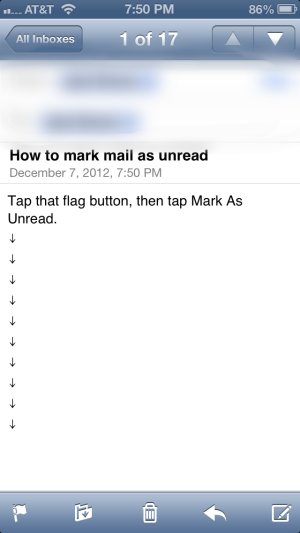
If you're using the native app it's easiest to do it from within the mail itself:
Photo Dec 07, 7 52 31 PM.jpg
If you want to do a bunch at once, then the Inbox>Edit method is the way to go. - 12-07-2012, 07:41 PM #7
Similar Threads
-
How to bypass the Reboot Loop after "Reset Network Settings "
By firas_op in forum Jailbreaking, Unlocking, Hacks, Themes & ModsReplies: 8Last Post: 07-22-2010, 06:26 AM -
What would it take for you to leave the iPhone?
By Jeremy in forum iPhone 4Replies: 11Last Post: 11-03-2008, 08:45 AM -
Does anyone know how to find the iPhone blog on the Twitterific App?
By iLoveiPhones in forum Facebook, Twitter, Google+ and SocialReplies: 2Last Post: 07-30-2008, 07:22 PM -
Mark Mail as unread and view inbox after reading
By hotrod in forum iPhone 4Replies: 2Last Post: 07-25-2008, 10:33 AM -
How to hack the iphone via PC- HELP PLEASE!
By hatembomb in forum iPhone 4Replies: 2Last Post: 11-19-2007, 05:52 PM
LinkBack URL
About LinkBacks
Reply