Results 1 to 11 of 11
- 12-30-2012, 04:11 PM
Thread Author #1
Apple n00b, iPad questions
Diehard BlackBerry fan here, just got my first Apple product. I picked myself up a 4th generation 16GB white 4G LTE iPad with Retina display (that was a mouthful!), and I'm looking to you folks to answer a couple questions and possibly offer some tips and tricks to help me get the most out of my new toy.
1: Is there anyway to sync Outlook Notes to my iPad? Calendar, Contacts, Email, and Tasks sync fine, but I can't find any option for Notes. I read that this can't be done wirelessly, but thought I should confirm with the experts. This seems odd. They sync to my BlackBerry over the BES just fine.
2: Is there anyway to collapse all subfolders in the email app? I have dozens of folders and subfolders in my Exchange account, and it's really annoying to scroll through all these to file a simple email. I couldn't imagine having to deal with this on my work email account which probably has thousands of subfolder.
Calendar -this one is really bugging me:
3: My appointments all synced with the Exchange server, but existing appointments are all in GMT time, but I'm set for Vancouver. Well I should rephrase: the appointment shows the correct Vancouver time in the day/week/month view, but when I open the appointment it shows in GMT time instead of PST like everything else is set. I turned the auto time zone setting on, but that didn't solve anything. - 12-30-2012, 05:58 PM #2
Re: Apple n00b, iPad questions
1: Is there anyway to sync Outlook Notes to my iPad? Calendar, Contacts, Email, and Tasks sync fine, but I can't find any option for Notes. I read that this can't be done wirelessly, but thought I should confirm with the experts. This seems odd. They sync to my BlackBerry over the BES just fine.
How do you have your Outlook account set up? I noticed in my accounts that with an Exchange account, there's no option for Notes, but with an IMAP account, there is.
2: Is there anyway to collapse all subfolders in the email app? I have dozens of folders and subfolders in my Exchange account, and it's really annoying to scroll through all these to file a simple email. I couldn't imagine having to deal with this on my work email account which probably has thousands of subfolder.
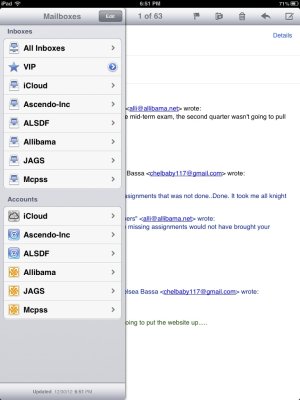
You should see two groups of email - one at the top just showing your inboxes and one below showing accounts where you can view all subfolders. Try just looking at the inbox view.
3: My appointments all synced with the Exchange server, but existing appointments are all in GMT time, but I'm set for Vancouver. Well I should rephrase: the appointment shows the correct Vancouver time in the day/week/month view, but when I open the appointment it shows in GMT time instead of PST like everything else is set. I turned the auto time zone setting on, but that didn't solve anything.
Is the Exchange server Google, by any chance? - 12-30-2012, 06:49 PM
Thread Author #3
Re: Apple n00b, iPad questions
Thanks for the quick reply, Alli!
Exchange. The Notes sync over to the Memo's app on my BlackBerry seemelessly. It's unfortunate that this isn't possible with iOS (maybe it's not a limitation of iOS specifically, but for the sake of the conversation I'm assinging blame there
Originally Posted by Alli1970972
).
I'm not quite sure I understand. When I got to the top level - Mailboxes - it shows the Inbox, then VIP (?), Sent, Trash, then the rest of my folders and sub-folders. I can click on Inbox just to see that, but it's annoying when I'm looking for an email or trying to file an email in a folder, that I have to scroll through all of the sub-folders just to find the main folder I'm looking for. The whole point of sub-folders is so I can group my folders in categories and not have to look inside each folder unless I need to. And the other thing I notice is that there is no easy way to jump back to the inbox once I'm in another folder. I have to scroll all the way to the top again. Unless of course there's a way that I just haven't figured out yet.
Originally Posted by Alli
Nope, my Exchange service is hosted through GoDaddy (side note, but I would never recommend them again). And I think I should clarify, as I may have mispoke. My default time is Vancouver - Pacific Standard Time. My appointments all show up that way in Calendar View (Day/Week/Month/Year/List), but when I open the appointment it's in Mountaub Standard Time. I thought it was only existing appointments, but it's actually all new appointments as well. It's really annoying, and I'm sure there has to be an easy solution that I am overlooking.
Originally Posted by Alli
PS I'd love to show you screenshots, but I haven't found a good screenshot app yet. Any suggestions? - 12-30-2012, 06:56 PM #4
Re: Apple n00b, iPad questions
Last to first - no need for a screenshot app in iOS. Just hold the power button and quickly tap the home button and let go of both. Instant screenshot. Bam!
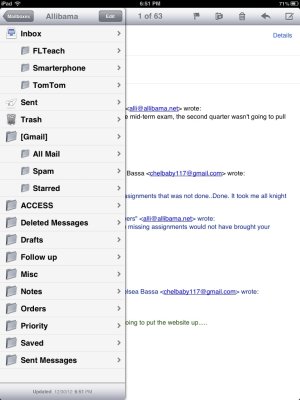
Screenshots here of your mailbox views. The first shows Inboxes at the top, Accounts below, and the second shows inside one of the accounts where you can see all folders. - 12-30-2012, 07:09 PM
Thread Author #5
Re: Apple n00b, iPad questions
Thanks for the screenshot tip! I actually only have email account on this device, so I only have 1 inbox and 1 account showing.
- 12-30-2012, 08:18 PM #6
Apple n00b, iPad questions
For the time zone--> settings, mail contacts and calendar, scroll down to calendar, then click on time zone support, turn it on and make sure the time zone is right.
iPhone 5 ✲ iPad 3 WiFi ✲ Macbook Pro running Lion 10.8.2 ✲ Xbox 360 ✲ Nintendo 3DS ✲ PS3
Beamed from a galaxy far, far away using Tapatalk!iPhone 5 ✲ iPad Mini AT&T ✲ Macbook Pro running Lion 10.8.3 ✲ Apple TV 2nd Gen ✲ Xbox 360 ✲ Nintendo 3DS ✲ PS3
@laelipoo on Twitter and App.net - 12-30-2012, 08:27 PM
Thread Author #7
- 12-30-2012, 09:17 PM #8
Apple n00b, iPad questions
Hmm, I am unsure then, sorry.
iPhone 5 ✲ iPad 3 WiFi ✲ Macbook Pro running Lion 10.8.2 ✲ Xbox 360 ✲ Nintendo 3DS ✲ PS3
Beamed from a galaxy far, far away using Tapatalk!iPhone 5 ✲ iPad Mini AT&T ✲ Macbook Pro running Lion 10.8.3 ✲ Apple TV 2nd Gen ✲ Xbox 360 ✲ Nintendo 3DS ✲ PS3
@laelipoo on Twitter and App.net - 12-30-2012, 11:24 PM #9
- 12-31-2012, 01:24 AM
Thread Author #10
- 01-02-2013, 01:26 AM #11
Similar Threads
-
Buying iPad 2 from Apple and JB question
By Gary86 in forum Jailbreaking, Unlocking, Hacks, Themes & ModsReplies: 7Last Post: 09-10-2011, 01:59 PM -
Email on iPad question
By happycamping in forum Original iPadReplies: 3Last Post: 04-08-2010, 10:09 AM -
Apple's iPad Jailbroken One Day After Launch
By DataCentre in forum Original iPadReplies: 0Last Post: 04-05-2010, 06:05 PM -
Music in Apple's iPad commercial - Goldspot
By ipadsuperfan in forum Apps & GamesReplies: 5Last Post: 02-04-2010, 11:45 PM -
Apple Denies iPad is "iPod for Giants"
By hungerartist in forum Original iPadReplies: 0Last Post: 01-28-2010, 01:51 PM
LinkBack URL
About LinkBacks
Reply